







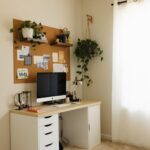


Creating an organized and productive home workspace is essential for anyone working remotely or managing tasks from home. A well-designed workspace can help you stay focused, reduce stress, and enhance your efficiency throughout the day. Whether you have a dedicated room or just a small corner in your living area, you can optimize your environment with some thoughtful adjustments. Here are some tips to help you build a productive and clutter-free home workspace.
Choose the Right Location
Find a Quiet Spot
Select a quiet area in your home where you can minimize distractions. Avoid high-traffic zones like kitchens or living rooms if possible. A separate room is ideal, but if space is limited, try to carve out a corner that can feel private and calm.
Consider Natural Light
Good lighting has a big impact on how you feel and work. Position your desk near a window to take advantage of natural daylight, which can boost your mood and reduce eye strain. If natural light is limited, invest in a quality desk lamp with adjustable brightness.
Invest in Ergonomic Furniture
Comfortable Chair
Your chair should support your back and encourage good posture. Look for adjustable chairs with lumbar support to avoid discomfort during long working sessions.
Suitable Desk Height
Adjust your desk or chair so your arms form a roughly 90-degree angle when typing. Your feet should rest flat on the floor or on a footrest to promote circulation.
Keep Your Workspace Organized
Declutter Regularly
Keep only essential items on your desk to avoid visual distractions. Regularly sort through papers, office supplies, and gadgets to maintain a tidy area.
Use Storage Solutions
Incorporate shelves, drawers, or baskets to store items you don’t need constantly. Label storage containers to quickly find what you need without creating mess.
Cable Management
Tidy up cables using clips, ties, or cable sleeves. Organized cords prevent tangling and reduce clutter that can make your desk look messy.
Personalize Your Environment
Add Plants
Indoor plants not only brighten up your workspace but can also improve air quality and reduce stress. Choose low-maintenance plants like succulents or pothos.
Decorate Thoughtfully
Incorporate a few personal items or artwork to make the space inviting, but avoid overcrowding. Your workspace should feel inspiring, not overwhelming.
Create a Functional Layout
Arrange Essentials Within Reach
Place frequently used items like your computer, phone, and notebook close to you to minimize movement and save time.
Separate Work Zones
If space allows, designate areas for different tasks—for example, one side of the desk for computer work and another for writing or reading.
Establish Clear Boundaries
Set Work Hours
Define specific working hours to help separate your professional and personal life. Communicate these boundaries to household members to reduce interruptions.
Signal Availability
Consider using visual cues like a “Do Not Disturb” sign or headphones to indicate when you need focused time.
Utilize Technology Wisely
Optimize Your Devices
Keep your computer, internet connection, and peripherals in good working order to avoid technical interruptions.
Use Productivity Tools
Use apps and digital calendars to organize your tasks and deadlines. Tools like timers or focus apps can help you stay on track during work sessions.
Maintain Healthy Habits
Take Regular Breaks
Step away from your desk every hour to stretch, hydrate, and rest your eyes. This can prevent fatigue and improve concentration.
Practice Good Posture
Check your sitting position frequently and adjust as needed to avoid strain.
—
By putting these tips into practice, you can create a home workspace that is not only well-organized but also tailored to your personal work style. A comfortable, efficient environment can make a significant difference in how productive and enjoyable your work-from-home experience becomes. Remember, the key is to keep your space simple, functional, and inspiring.